الرجوع للقائمة الرئيسية (Back to Home)

Lecture 11: File I/O & Exceptions

المحاضرة 11: التعامل مع الملفات ومعالجة الأخطاء (File I/O & Exception Handling)

الشرح التفصيلي لجميع شرائح المحاضرة (Slide-by-Slide) مدعوم بشرح الأكواد سطراً بسطر (Line-by-Line Code Explanation)

Slide 3: مفهوم التيارات (Introduction to Streams)
Slide 3

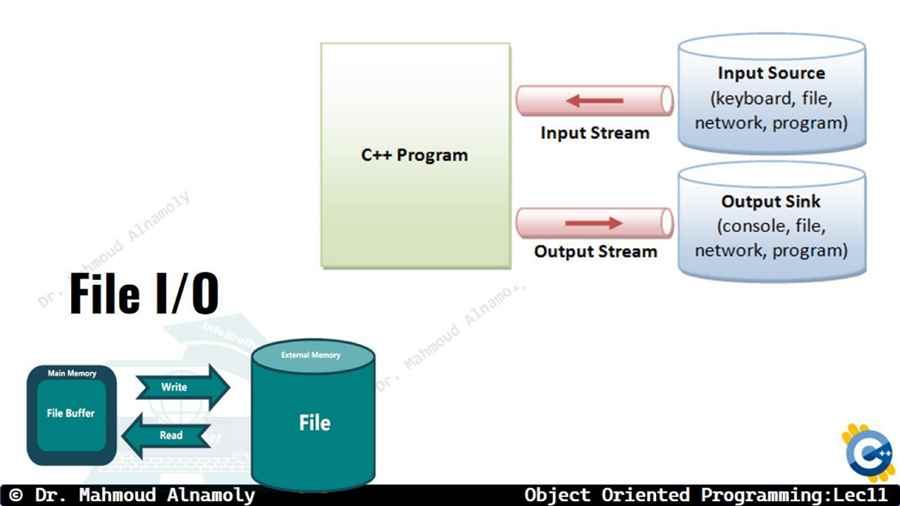
في لغة الـ C++، عملية إدخال وإخراج البيانات (I/O) بتتم عن طريق حاجة اسمها Stream (تيار).

التيار ده عبارة عن مجرى وهمي بتنتقل فيه البيانات بايت ورا بايت (Byte by Byte) من المصدر للهدف. إحنا استخدمنا التيارات دي كتير قبل كده:

  • cin: تيار الإدخال (Input Stream) اللي بياخد البيانات من الكيبورد ويدخلها للبرنامج.
  • cout: تيار الإخراج (Output Stream) اللي بياخد البيانات من البرنامج ويطلعها على الشاشة.

المشكلة إن البيانات دي بمجرد ما تقفل البرنامج بتطير (Volatile). عشان كده إحنا محتاجين تيارات جديدة تقدر تتعامل مع الملفات (Files) عشان نحفظ الداتا بشكل دائم على الهارد ديسك.

Slide 5: مكتبة التعامل مع الملفات (The 'fstream' Library)
Slide 5

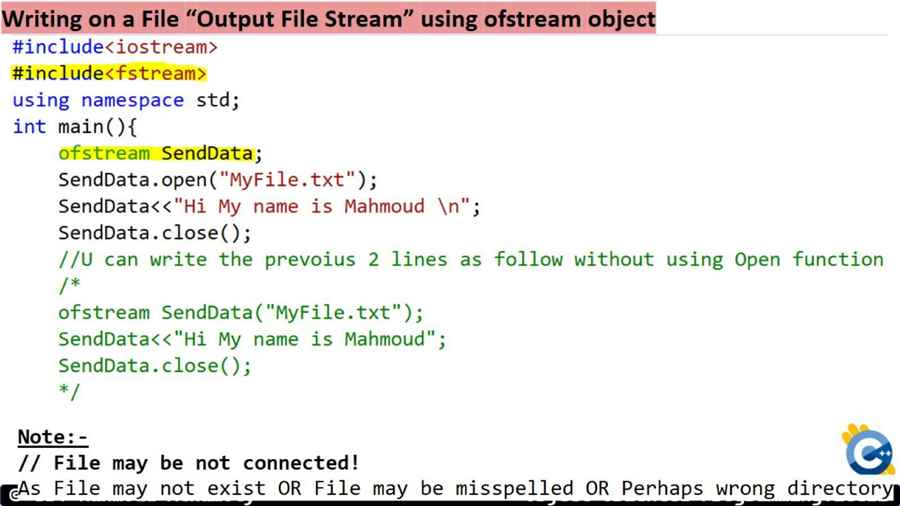
عشان نقدر نفتح ملفات ونكتب فيها أو نقرا منها، لازم نعمل #include <fstream> (File Stream). المكتبة دي بتوفرلنا 3 كلاسات (Classes) أساسية:

  1. ofstream (Output File Stream): ده كلاس وظيفته الكتابة (Write) في الملفات. زيه زي الـ cout بالظبط بس بدل ما بيطبع على الشاشة، بيطبع جوه ملف.
  2. ifstream (Input File Stream): ده كلاس وظيفته القراءة (Read) من الملفات. زيه زي الـ cin، بس بدل ما بياخد من الكيبورد، بياخد من الملف.
  3. fstream: ده الكلاس الشامل اللي يقدر يعمل القراءة والكتابة مع بعض.

Slide 8: أوضاع فتح الملفات (File Opening Modes)
Slide 8

لما بنيجي نفتح ملف باستخدام دالة open()، ممكن نحدد إحنا هنفتحه عشان نعمل فيه إيه بالظبط عن طريق الـ File Modes. دي بتيجي في الاختيارات دايماً:

  • ios::out : فتح الملف للكتابة (ولو الملف موجود هيمسح كل اللي فيه ويبدأ من جديد!).
  • ios::in : فتح الملف للقراءة فقط.
  • ios::app (Append): فتح الملف للكتابة، بس بيحتفظ بالكلام القديم وبيكمل (بيلزق) عليه في الآخر. (مهمة جداً لملفات الـ Logs).
  • ios::trunc : تدمير/مسح محتوى الملف القديم بالكامل عند فتحه.

Slide 11: كود الكتابة في ملف (Writing to a File)
Slide 11

تعالوا نشوف إزاي بنعمل Object من نوع ofstream عشان نكتب جوه ملف .txt:

#include <iostream> #include <fstream> // Mandatory for File I/O using namespace std; int main() { // 1. Create an output stream object ofstream outFile; // 2. Open the file (it will create it if it doesn't exist) outFile.open("student_data.txt"); // Defensive Programming: Check if file opened successfully if (!outFile) { cout << "Error opening file!" << endl; return 1; } // 3. Write data to the file using the insertion operator << outFile << "Name: Ahmed Ali" << endl; outFile << "Grade: A+" << endl; // 4. CRITICAL: Always close the file when done! outFile.close(); cout << "Data saved successfully." << endl; return 0; }

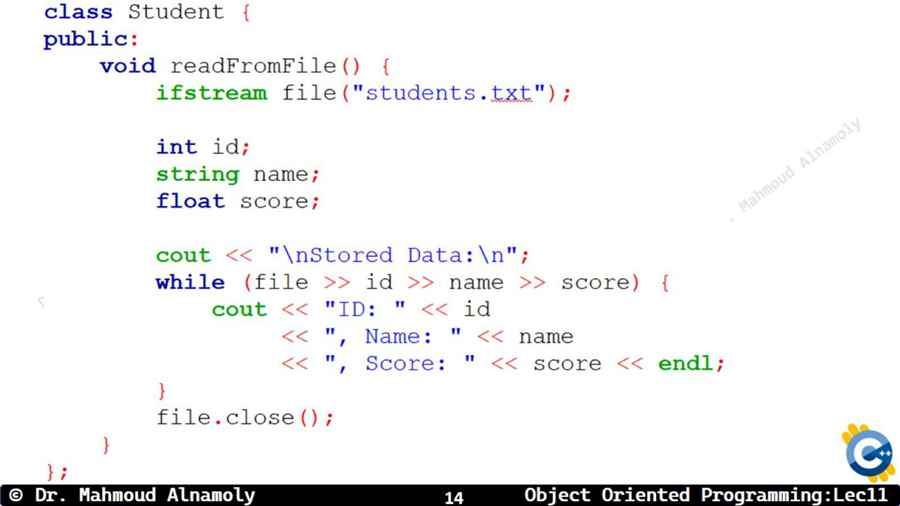
Slide 14: كود القراءة من ملف (Reading from a File)
Slide 14

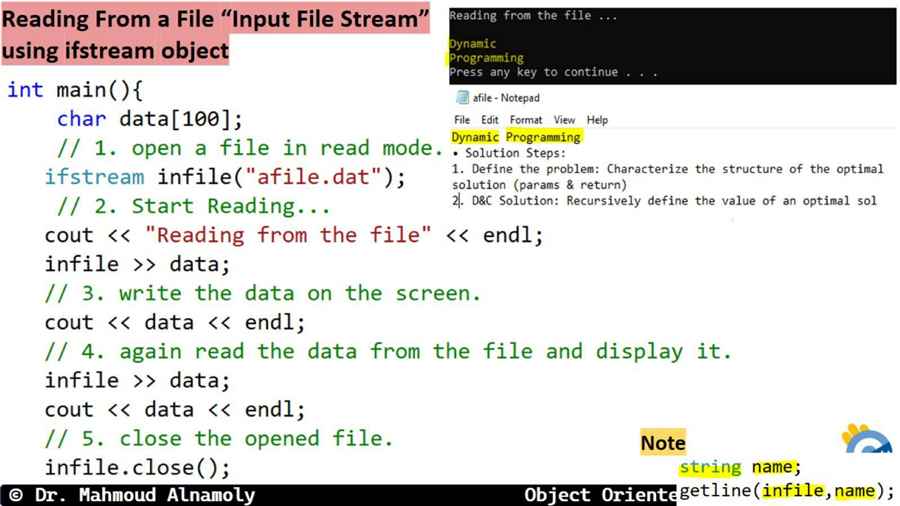
عشان نقرا البيانات اللي إحنا لسه كاتبينها دي ونعرضها على الشاشة، هنستخدم ifstream:

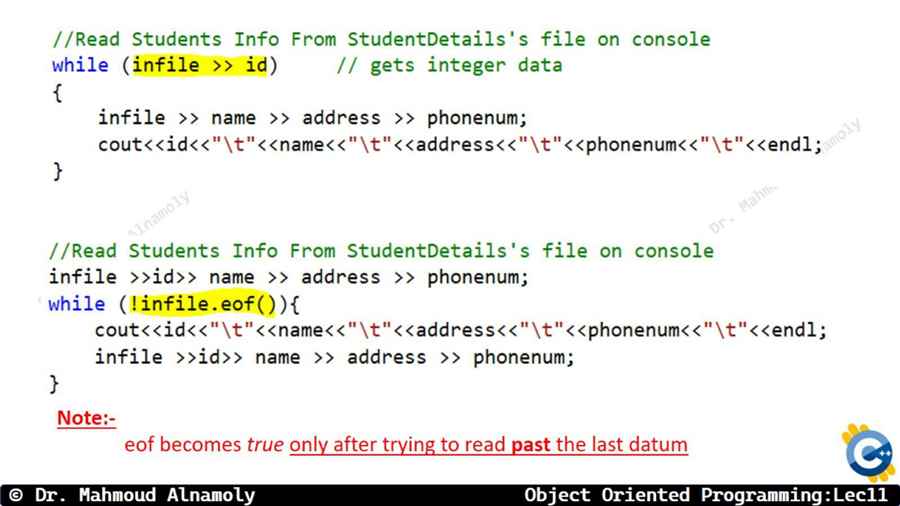
int main() { ifstream inFile; // Input stream object inFile.open("student_data.txt"); if (!inFile) { cout << "Error: File not found!" << endl; return 1; } string line; // Read the file line by line until End Of File (EOF) while ( getline(inFile, line) ) { cout << line << endl; // Print each line to the screen } inFile.close(); // Don't forget to close! return 0; }
  • دالة getline() بتاخد سطر كامل من الملف (بالمسافات اللي فيه) وتخزنه في متغير الـ String. وبتفضل شغالة جوه الـ while لحد ما الملف يخلص خالص.

Quiz 1: File Streams

1. Which file mode should you use if you want to write new data to the END of an existing file without deleting its current contents?

2. What is the correct class to use if you ONLY want to READ data from a file into your program?

Slide 17: معالجة الأخطاء (Exception Handling)
Slide 17

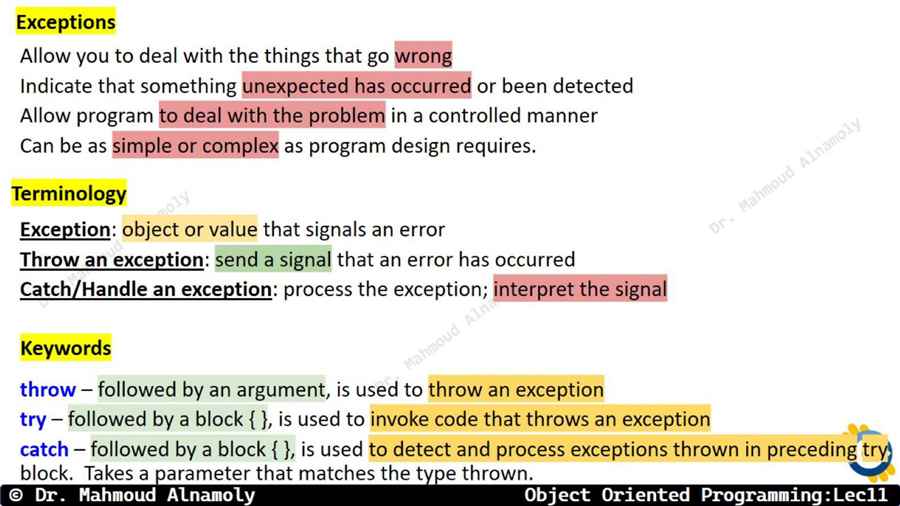
تخيل بتعمل برنامج آلة حاسبة، واليوزر الغبي راح قسم رقم على 0. إيه اللي هيحصل؟ البرنامج هينفجر (Crash) ويقفل في وشه فجأة! ده اسمه Run-time Error.

عشان نمنع الـ Crash المهين ده ونخلي البرنامج محترم ويطلع رسالة خطأ شيك ويكمل شغل، بنستخدم الـ Exception Handling (معالجة الاستثناءات/الأخطاء).

Slide 18: الكلمات المفتاحية الثلاث (Try, Throw, Catch)
Slide 18

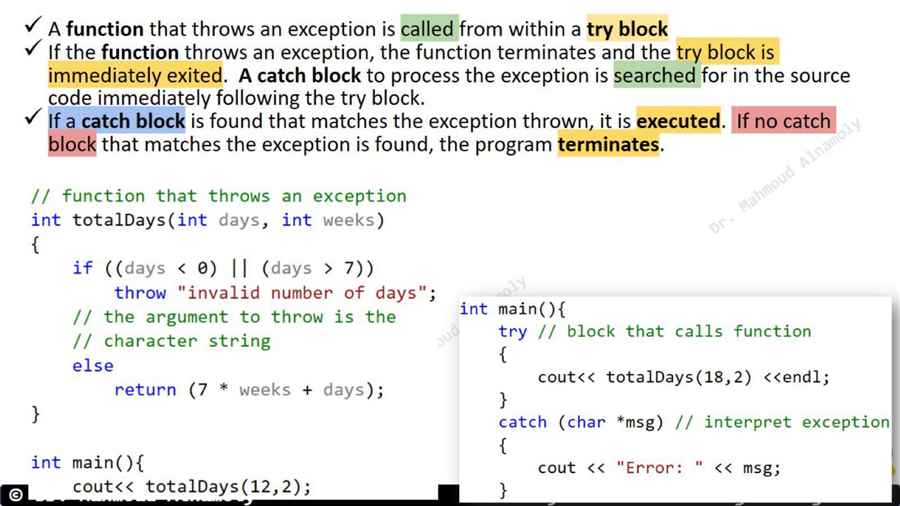
السيستم ده بيعتمد على 3 كلمات (لازم يجوا مع بعض زي الترس):

  • try (حاول): ده البلوك اللي بنحط جواه الكود اللي "شاكين" إنه ممكن يعمل كارثة (زي كود القسمة). بنقول للبرنامج: حاول تنفذ ده، ولو حصلت مصيبة عينك عليها.
  • throw (ارمي): لو الكارثة حصلت فعلاً (زي إن المقام طلع بصفر)، بنستخدم الكلمة دي عشان نرمي الـ Error (الاستثناء) بره الـ try block.
  • catch (امسك): ده بلوك عامل زي شبكة الإنقاذ. واقف تحت الـ try مستني أي error يترمي عشان يمسكه ويطلع رسالة لليوزر، ويخلي البرنامج ما يقفلش ويكمل عادي.

Slide 20: كود القسمة على صفر (Division by Zero Example)
Slide 20

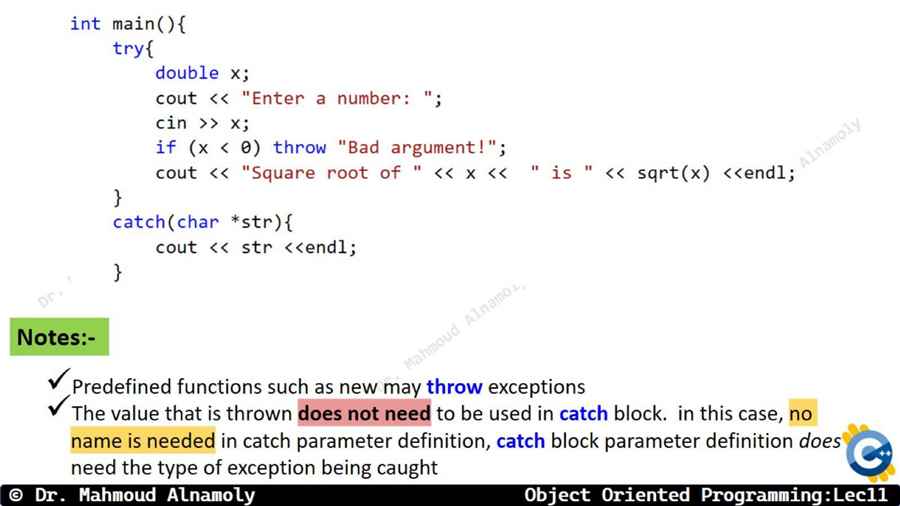
ده أشهر كود بيوضح فكرة الـ Exception Handling في كل الجامعات:

int main() { int a = 10; int b; cout << "Enter denominator: "; cin >> b; try { // 1. The dangerous code block if (b == 0) { // 2. If problem happens, throw an error value (could be int, string, etc.) throw "Division by Zero is not allowed!"; } // If b is NOT 0, this runs normally and 'throw' is ignored int result = a / b; cout << "Result = " << result << endl; } // 3. The Catch block waiting for a string error (const char*) catch (const char* errorMessage) { // Graceful failure: Print error but don't crash cout << "Exception Caught: " << errorMessage << endl; } // This line WILL print even if an error occurred! The program survived! cout << "Program continues normally..." << endl; return 0; }

Final Quiz: Exceptions

1. What is the primary purpose of the `try` block in Exception Handling?

2. What happens to the program's execution immediately after a `throw` statement is executed inside a `try` block?

الملخص الشامل لأهم التريكات (Summary & Pro Tips)

سؤال مقالي متوقع للامتحان (Essay Question)

Question: Explain File I/O in C++ using the `fstream` library. Discuss the three main classes (`ofstream`, `ifstream`, `fstream`) and the different file opening modes. Then explain Exception Handling using `try`, `throw`, and `catch` with a practical example.

🖥️ What is the output of the following code?

Q1:

int main() { try { cout << "A "; throw 404; cout << "B "; } catch (int e) { cout << "Error " << e << " "; } cout << "C"; }

Q2:

int main() { ofstream file("data.txt", ios::trunc); file << "Hello "; file.close(); ofstream file2("data.txt", ios::app); file2 << "World"; file2.close(); }

✍️ Write a line of code for the following statements

Q1: Include the necessary library for File Input/Output operations.

Q2: Open a file named log.txt for writing in APPEND mode so previous data isn't deleted.

Q3: Write a line of code that reads an entire string containing spaces from the keyboard into a string variable fullName.

🔍 Based on the following code, answer all the following questions

int main() { ifstream inFile; inFile.open("scores.txt"); if (!inFile) { cout << "File not found!" << endl; return 1; } int sum = 0, num; while (inFile >> num) { sum += num; } cout << "Sum = " << sum << endl; inFile.close(); }

a) What is the purpose of the if (!inFile) check?

b) What does the condition while (inFile >> num) do?

c) What is the direction of the stream arrows (>>) when reading from a file, and what do they point to?